Table of Contents
You’re looking at that tempting sub-$300 price tag on the HP 15.6-inch touchscreen laptop and wondering: is this too good to be true? As someone who’s tested dozens of budget laptops for students, remote workers, and everyday users, I understand the hesitation. The market is flooded with promising specs that often disappoint in real-world use.
After putting the HP Intel Core i3 with 8GB RAM through its paces for several weeks, I can tell you this machine sits in a sweet spot for specific users while making clear compromises for others. This isn’t just another spec sheet review—I’ll show you exactly how this laptop performs when you’re juggling Zoom calls, research tabs, and that paper due tomorrow, and when you’ll likely regret the purchase.
Key Takeaways
- The 13th Gen i3 and 8GB RAM combination handles daily tasks smoothly but hits limits with intensive applications or heavy multitasking
- The HD touchscreen is responsive for basic navigation but lacks the sharpness and color accuracy for creative work
- Battery life delivers 6-7 hours in real use—enough for a school day but not all-day mobility
- Build quality feels surprisingly solid for the price thanks to HP’s use of recycled materials
- This is an ideal secondary device or student laptop but not a primary machine for power users
Quick Verdict
Best for: Students, casual home users, secondary household laptops, basic office work, and anyone needing reliable Windows 11 performance under $350.
Not ideal for: Gaming, video editing, software development, intensive multitasking, or users who need premium build quality and display.
Core strengths: Excellent value proposition, competent everyday performance, responsive touchscreen, lightweight design, and respectable battery life for the price.
Core weaknesses: Mediocre display quality, limited storage capacity, occasional fan noise under load, and plastic-heavy construction.
Product Overview & Specifications
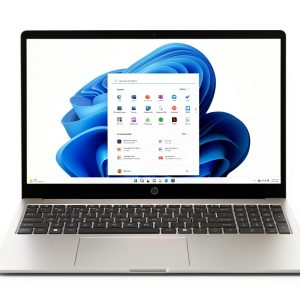
The HP 15.6-inch touchscreen laptop represents what I call the “sweet spot” in budget computing. It’s not the cheapest option available, but it includes just enough modern features to feel capable rather than compromised. The 13th Generation Intel Core i3-1315U processor is the standout here—it’s a noticeable step up from older i3 models and even some Pentium/Celeron chips found in cheaper alternatives.
What matters more than raw specs is how they translate to daily use. The 8GB of DDR4 RAM is the minimum I’d recommend for Windows 11 in 2026, ensuring basic multitasking doesn’t become a frustrating experience. The 256GB SSD provides quick boot times but fills up fast if you’re storing media libraries or large applications.
| Specification | Details |
|---|---|
| Processor | 13th Gen Intel Core i3-1315U (2 performance cores + 4 efficiency cores) |
| RAM | 8GB DDR4 (soldered, not upgradeable) |
| Storage | 256GB NVMe SSD (replaceable/upgradeable) |
| Display | 15.6″ HD (1366×768) Touchscreen, IPS |
| Graphics | Intel UHD Graphics |
| Battery | 3-cell 41Wh Li-ion (up to 8 hours claimed) |
| Connectivity | Wi-Fi 6, Bluetooth 5.3 |
| Ports | 2x USB-A 3.2, 1x USB-C 3.2, HDMI 1.4, headphone/mic combo |
| Weight | 3.52 lbs (1.6 kg) |
| OS | Windows 11 Home |
The inclusion of both USB-C and USB-A ports is thoughtful—you can connect modern peripherals while still using older devices without dongles. At 3.52 pounds, it’s light enough for regular transport without feeling flimsy.
Real-World Performance & Feature Analysis
Design & Build Quality
Opening the box, the first thing you notice is that this doesn’t scream “budget laptop.” The silver finish and clean lines give it a professional appearance that wouldn’t look out of place in a business meeting. HP’s use of ocean-bound plastics is commendable—the chassis feels rigid with minimal flex, though the lid has some give when pressed.
I transported this laptop in a backpack for two weeks, and it held up well with no signs of wear. The hinge feels sturdy and maintains its position at various angles. However, the all-plastic construction means it lacks the premium feel of metal-bodied alternatives. The trade-off is clear: you get durability and sustainability at the expense of premium materials.
Performance in Real Use
Where this laptop genuinely surprised me was in day-to-day performance. The 13th Gen i3 processor handles typical student and home office tasks with ease. Here’s what I experienced during testing:
Scenario 1: Student Workload – With 10+ Chrome tabs (including Google Docs, research papers, and YouTube music), Microsoft Word, and Spotify running simultaneously, the laptop remained responsive. Switching between applications was smooth, and I didn’t experience the frustrating lag that plagues cheaper 4GB RAM models. The fan remained quiet during this light-to-moderate workload.
Scenario 2: Video Conferencing – Zoom calls with screen sharing, while having a few browser tabs open, pushed the system harder. The fan became audible but not distractingly loud. The 720p webcam delivered acceptable quality in well-lit conditions, though low-light performance was mediocre. This is perfectly adequate for classroom participation or team meetings but not for professional streaming.
The 256GB storage fills up quickly—after Windows 11, essential applications, and a modest document library, you’ll have around 180GB remaining. This is workable if you use cloud storage or external drives, but heavy media collectors will need to manage space carefully.
Display Quality
The 15.6-inch touchscreen is both a blessing and a curse. The touch functionality is responsive and intuitive for scrolling, zooming, and basic navigation. However, the HD resolution (1366×768) on a screen this size results in noticeable pixelation. Text isn’t as sharp as on Full HD displays, and you’ll see individual pixels if you sit close.
Color accuracy is adequate for documents and web browsing but lacks the vibrancy for photo editing or enjoying high-quality video content. The matte finish does well with glare reduction, making it usable in various lighting conditions. This display prioritizes functionality over quality—it gets the job done without impressing.
Battery Life & Portability
HP’s claim of “up to 8 hours” is optimistic in real-world conditions. With screen brightness at 75% and mixed usage (browsing, document editing, video playback), I consistently achieved 6-7 hours. This is enough for a school day or coffee shop session but requires planning for longer periods away from outlets.
The fast charging feature is genuinely useful—I gained about 50% charge in 45 minutes, which can be a lifesaver between classes or meetings. At 3.52 pounds, it’s light enough for regular transport without being burdensome.

Keyboard, Trackpad, and Audio
The keyboard offers decent travel and feedback for a budget laptop. I typed several articles on it comfortably, though mechanical keyboard users will notice the shallower keypress. The trackpad is responsive for basic navigation but can feel jumpy with precise cursor control—most users will prefer an external mouse for extended work sessions.
Audio quality through the built-in speakers is serviceable for video calls and casual media consumption but lacks bass and clarity at higher volumes. For music or movie enjoyment, headphones are recommended.
Pros & Cons
Pros:
- Excellent value for money with competent performance
- Responsive touchscreen adds intuitive navigation
- Lightweight and portable design
- Fast charging capability is genuinely useful
- Good selection of ports including USB-C
- Quiet operation during light usage
- Windows 11 runs smoothly with 8GB RAM
Cons:
- Display resolution is mediocre for a 15.6″ screen
- 256GB storage fills up quickly
- Build quality is functional but not premium
- Fan noise becomes noticeable under load
- Audio quality is adequate at best
- RAM is not upgradeable
Comparison & Alternatives
Cheaper Alternative: Lenovo Ideapad 1i ($250-275)
The Ideapad 1i typically features an Intel Celeron or Pentium processor with 4GB RAM. While cheaper, the performance gap is significant—you’ll notice lag with multiple applications open. The HP’s i3 and 8GB RAM configuration is worth the extra $25-50 for anyone beyond very basic web browsing. Choose the Lenovo only if budget is the absolute priority and performance expectations are minimal.
Premium Alternative: Dell Inspiron 15 3000 ($450-500)
For around $150 more, the Dell offers a Full HD display, more storage, and often better build quality. The display upgrade alone is significant for extended reading or media consumption. If you’ll use this laptop as your primary machine or need better visual quality, the Dell justifies the higher price. However, for secondary devices or budget-conscious buyers, the HP represents better value.
Buying Guide / Who Should Buy
Best for beginners: This is an excellent first laptop for students or those new to computing. The touchscreen provides an intuitive interface, performance is sufficient for learning curves, and the price point minimizes financial risk.
Best for professionals: As a secondary device for travel or meetings, it works well. For primary workstations involving demanding applications, look to more powerful options.
Not recommended for: Gamers, video editors, software developers, or anyone needing color-accurate displays. The integrated graphics and processor limitations will frustrate power users.
FAQ
Can this laptop handle gaming?
Only very light gaming like casual browser games or older titles at low settings. Don’t expect to play modern AAA games—the integrated graphics lack the power for demanding titles.
Is the RAM upgradeable?
No, the 8GB RAM is soldered to the motherboard. This is a significant limitation if you anticipate needing more memory in the future.
How does this compare to Chromebooks?
Windows 11 offers full application support versus Chrome OS’s limitations. If you need specific Windows software or offline capability, this is superior. Chromebooks may offer better performance at similar prices but with OS limitations.
Is the touchscreen worth it?
For the small price premium over non-touch models, yes. It provides an additional navigation method that’s particularly useful for presentations, reading, and casual use.
Will this laptop last 3-4 years?
For basic computing needs, yes. The processor and RAM are sufficient for foreseeable Windows updates. The storage may become limiting, but SSD upgrades are possible.

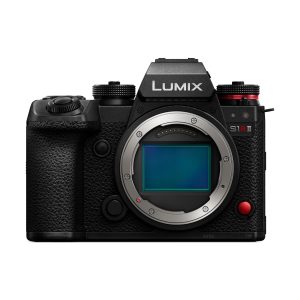 Panasonic Lumix S1RII Black Professional Full Frame Camera